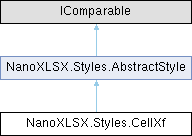
Class representing an XF entry. The XF entry is used to make reference to other style instances like Border or Fill and for the positioning of the cell content.
More...
|
| enum | HorizontalAlignValue {
Left
, Center
, Right
, Fill
,
Justify
, General
, CenterContinuous
, Distributed
,
None
} |
| | Enum for the horizontal alignment of a cell, used by the CellXf class. More...
|
| enum | TextBreakValue { WrapText
, ShrinkToFit
, None
} |
| | Enum for text break options, used by the CellXf class. More...
|
| enum | TextDirectionValue { Horizontal
, Vertical
} |
| | Enum for the general text alignment direction, used by the CellXf class. More...
|
| enum | VerticalAlignValue {
Bottom
, Top
, Center
, Justify
,
Distributed
, None
} |
| | Enum for the vertical alignment of a cell, used by the CellXf class. More...
|
|
| | CellXf () |
| | Default constructor.
|
| override string | ToString () |
| | Override toString method.
|
| override int | GetHashCode () |
| | Returns a hash code for this instance.
|
| override bool | Equals (object obj) |
| | Returns whether two instances are the same.
|
| override AbstractStyle | Copy () |
| | Method to copy the current object to a new one without casting.
|
| CellXf | CopyCellXf () |
| | Method to copy the current object to a new one with casting.
|
| AbstractStyle | Copy () |
| | Abstract method to copy a component (dereferencing).
|
| int | CompareTo (AbstractStyle other) |
| | Method to compare two objects for sorting purpose.
|
| bool | Equals (AbstractStyle other) |
| | Method to compare two objects for sorting purpose.
|
|
| bool | ForceApplyAlignment [get, set] |
| | Gets or sets whether the applyAlignment property (used to merge cells) will be defined in the XF entry of the style. If true, applyAlignment will be defined.
|
| bool | Hidden [get, set] |
| | Gets or sets whether the hidden property (used for protection or hiding of cells) will be defined in the XF entry of the style. If true, hidden will be defined.
|
| HorizontalAlignValue | HorizontalAlign [get, set] |
| | Gets or sets the horizontal alignment of the style.
|
| bool | Locked [get, set] |
| | Gets or sets whether the locked property (used for locking / protection of cells or worksheets) will be defined in the XF entry of the style. If true, locked will be defined.
|
| TextBreakValue | Alignment [get, set] |
| | Gets or sets the text break options of the style.
|
| TextDirectionValue | TextDirection [get, set] |
| | Gets or sets the direction of the text within the cell.
|
| int | TextRotation [get, set] |
| | Gets or sets the text rotation in degrees (from +90 to -90).
|
| VerticalAlignValue | VerticalAlign [get, set] |
| | Gets or sets the vertical alignment of the style.
|
| int | Indent [get, set] |
| | Gets or sets the indentation in case of left, right or distributed alignment. If 0, no alignment is applied.
|
| int? | InternalID [get, set] |
| | Gets or sets the internal ID for sorting purpose in the Excel style document (nullable).
|
Class representing an XF entry. The XF entry is used to make reference to other style instances like Border or Fill and for the positioning of the cell content.
Definition at line 18 of file CellXf.cs.
◆ HorizontalAlignValue
Enum for the horizontal alignment of a cell, used by the CellXf class.
| Enumerator |
|---|
| Left | Content will be aligned left.
|
| Center | Content will be aligned in the center.
|
| Right | Content will be aligned right.
|
| Fill | Content will fill up the cell.
|
| Justify | justify alignment
|
| General | General alignment.
|
| CenterContinuous | Center continuous alignment.
|
| Distributed | Distributed alignment.
|
| None | No alignment. The alignment will not be used in a style.
|
Definition at line 49 of file CellXf.cs.
◆ TextBreakValue
Enum for text break options, used by the CellXf class.
| Enumerator |
|---|
| WrapText | Word wrap is active.
|
| ShrinkToFit | Text will be resized to fit the cell.
|
| None | Text will overflow in cell.
|
Definition at line 74 of file CellXf.cs.
◆ TextDirectionValue
Enum for the general text alignment direction, used by the CellXf class.
| Enumerator |
|---|
| Horizontal | Text direction is horizontal (default).
|
| Vertical | Text direction is vertical.
|
Definition at line 87 of file CellXf.cs.
◆ VerticalAlignValue
Enum for the vertical alignment of a cell, used by the CellXf class.
| Enumerator |
|---|
| Bottom | Content will be aligned on the bottom (default).
|
| Top | Content will be aligned on the top.
|
| Center | Content will be aligned in the center.
|
| Justify | justify alignment
|
| Distributed | Distributed alignment.
|
| None | No alignment. The alignment will not be used in a style.
|
Definition at line 98 of file CellXf.cs.
◆ CellXf()
| NanoXLSX.Styles.CellXf.CellXf |
( |
| ) |
|
Default constructor.
Definition at line 200 of file CellXf.cs.
◆ Copy()
Method to copy the current object to a new one without casting.
- Returns
- Copy of the current object without the internal ID
Definition at line 313 of file CellXf.cs.
◆ CopyCellXf()
| CellXf NanoXLSX.Styles.CellXf.CopyCellXf |
( |
| ) |
|
Method to copy the current object to a new one with casting.
- Returns
- Copy of the current object without the internal ID
Definition at line 334 of file CellXf.cs.
◆ Equals()
| override bool NanoXLSX.Styles.CellXf.Equals |
( |
object | obj | ) |
|
Returns whether two instances are the same.
- Parameters
-
- Returns
- True if this instance and the other are the same
Definition at line 293 of file CellXf.cs.
◆ GetHashCode()
| override int NanoXLSX.Styles.CellXf.GetHashCode |
( |
| ) |
|
Returns a hash code for this instance.
- Returns
- A hash code for this instance, suitable to be used in hashing algorithms and data structures like a hash table.
Definition at line 270 of file CellXf.cs.
◆ ToString()
| override string NanoXLSX.Styles.CellXf.ToString |
( |
| ) |
|
Override toString method.
- Returns
- String of a class instance
Definition at line 246 of file CellXf.cs.
◆ DefaultAlignment
Default text break value as constant.
Definition at line 28 of file CellXf.cs.
◆ DefaultHorizontalAlignment
Default horizontal align value as constant.
Definition at line 24 of file CellXf.cs.
◆ DefaultTextDirection
Default text direction value as constant.
Definition at line 32 of file CellXf.cs.
◆ DefaultVerticalAlignment
Default vertical align value as constant.
Definition at line 36 of file CellXf.cs.
◆ Alignment
Gets or sets the text break options of the style.
Definition at line 140 of file CellXf.cs.
◆ ForceApplyAlignment
| bool NanoXLSX.Styles.CellXf.ForceApplyAlignment |
|
getset |
Gets or sets whether the applyAlignment property (used to merge cells) will be defined in the XF entry of the style. If true, applyAlignment will be defined.
Definition at line 120 of file CellXf.cs.
◆ Hidden
| bool NanoXLSX.Styles.CellXf.Hidden |
|
getset |
Gets or sets whether the hidden property (used for protection or hiding of cells) will be defined in the XF entry of the style. If true, hidden will be defined.
Definition at line 125 of file CellXf.cs.
◆ HorizontalAlign
Gets or sets the horizontal alignment of the style.
Definition at line 130 of file CellXf.cs.
◆ Indent
| int NanoXLSX.Styles.CellXf.Indent |
|
getset |
Gets or sets the indentation in case of left, right or distributed alignment. If 0, no alignment is applied.
Definition at line 178 of file CellXf.cs.
◆ Locked
| bool NanoXLSX.Styles.CellXf.Locked |
|
getset |
Gets or sets whether the locked property (used for locking / protection of cells or worksheets) will be defined in the XF entry of the style. If true, locked will be defined.
Definition at line 135 of file CellXf.cs.
◆ TextDirection
Gets or sets the direction of the text within the cell.
Definition at line 145 of file CellXf.cs.
◆ TextRotation
| int NanoXLSX.Styles.CellXf.TextRotation |
|
getset |
Gets or sets the text rotation in degrees (from +90 to -90).
Definition at line 158 of file CellXf.cs.
◆ VerticalAlign
Gets or sets the vertical alignment of the style.
Definition at line 172 of file CellXf.cs.
The documentation for this class was generated from the following file: